Forgot your garage keypad code or moved into a new home? You’re probably wondering, “How To Change Garage Door Code Without Old Code?” The good news is that you don’t need the old code at all. With a few simple steps, you can reset your system and create a new secure code in minutes.
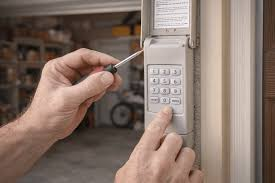
How To Change Garage Door Code Without Old Code (Quick Answer)
To change your code without the old one, you’ll need to reset the garage door opener using the “Learn” button and then program a new code.
Basic Process:
- Press and hold the Learn button (6–10 seconds)
- Wait for the LED light to turn off (memory cleared)
- Enter a new code on your keypad
- Press “Enter” to sync
👉 This works for most modern garage door openers.
Read too: Tc1 Tricode Garage Door Opener Remote W/ Clip Chamberlain: Complete Guide
Why Would You Need to Change Your Garage Door Code?
There are several common situations where resetting your code is necessary.
Common Reasons:
- You forgot the old code
- You just moved into a new home
- Lost or stolen remote
- Security concerns
- Renting or selling property
According to general home security principles explained on Wikipedia
(https://en.wikipedia.org/wiki/Garage_door_opener), resetting access codes is essential to prevent unauthorized entry.
Where Is the Learn Button Located?
Before resetting your code, you need to find the Learn button.
Typical Locations:
- On the back or side of the motor unit
- Under the light cover panel
- Near the antenna wire
Common Button Colors:
| Color | System Type |
|---|---|
| Yellow | Newer models |
| Purple | Mid-range models |
| Red/Orange | Older units |
| Green | Legacy systems |
💡 Tip: You may need a ladder to access the motor unit safely.
Step-by-Step: Reset Garage Door Code Without Old Code
Follow these detailed steps carefully.
Step 1: Access the Motor Unit
- Use a ladder
- Ensure power is connected
Step 2: Press and Hold the Learn Button
- Hold for 6–10 seconds
- LED light will turn off
👉 This clears all stored codes and remotes
Step 3: Program a New Keypad Code
- Enter your desired 4-digit code
- Press and hold the Enter button
- Wait for the opener light to blink
Step 4: Test the New Code
- Enter the new code
- Confirm the door opens/closes
How to Program a Remote After Reset
Resetting the system erases all devices.
Steps:
- Press the Learn button once
- Within 30 seconds, press the remote button
- Wait for confirmation (light blink or click)
What If the Reset Doesn’t Work?
Sometimes things don’t go as planned.
Possible Issues:
- Learn button not responding
- Power supply issues
- Faulty keypad
- Signal interference
Fixes:
- Check power connection
- Replace keypad batteries
- Try again within 30-second window
Is Resetting Your Garage Door Safe?
Yes—resetting your system is actually a recommended security practice.
Security Benefits:
- Removes unauthorized access
- Prevents code hacking
- Updates system credentials
Modern garage systems use rolling code technology, which changes the signal after each use.
Common Mistakes to Avoid
Avoid these errors to ensure success:
- Holding the Learn button too long (multiple resets)
- Waiting too long to enter a new code
- Using weak or easy-to-guess codes
- Ignoring battery replacement
How Long Does It Take to Change the Code?
Estimated Time:
| Task | Time |
|---|---|
| Reset system | 1–2 minutes |
| Program keypad | 2–3 minutes |
| Test operation | 1 minute |
👉 Total time: حوالي 5 minutes
Tips to Create a Strong Garage Door Code
Your new code should be secure.
Best Practices:
- Avoid simple codes like “1234”
- Use random number combinations
- Change code every 6–12 months
- Don’t share code publicly
Advantages vs Disadvantages of Resetting Code
✅ Advantages
- Improves security
- Removes unknown access
- Quick and easy process
- No special tools required
❌ Disadvantages
- All remotes must be reprogrammed
- Requires access to motor unit
- May be confusing for beginners
FAQ Section
1. Can I change my garage door code without the old one?
Yes, you can reset the system using the Learn button and create a new code.
2. Will resetting erase all remotes?
Yes, all remotes and keypads will need to be reprogrammed.
3. What if I can’t find the Learn button?
Check under the light cover or near the antenna wire on the motor unit.
4. How often should I change my garage code?
Every 6–12 months or after any security concern.
5. Can I reset the code without a ladder?
Usually no, as the motor unit is mounted on the ceiling.
6. What happens if I press the Learn button briefly?
It enters programming mode instead of resetting the system.
Conclusion
Now you know exactly how to change garage door code without old code—and it’s easier than most people think. With just a few steps, you can reset your system, improve security, and regain full control of your garage.
Taking a few minutes to update your code can prevent major security risks later.
If this guide helped you, share it on social media so others can secure their homes quickly and confidently!
Leave a Reply