Changing your garage door code is crucial for maintaining security, especially if someone who previously had access no longer should. Many homeowners ask How To Change Code On Garage Door Keypad LiftMaster because keypad access is convenient but can be risky if codes aren’t updated. This guide will help you safely and efficiently reset your keypad code in just a few steps.
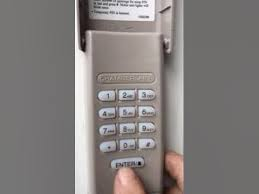
What Is a LiftMaster Keypad?
LiftMaster is a leading brand in garage door openers developed by Chamberlain Group. Their wireless keypads allow secure, keyless access to your garage.
Read too: How Do You Change Code On Garage Door Keypad Fast?
Key Features:
- Programmable PIN codes
- Weather-resistant design
- Backlit for nighttime use
- Works with LiftMaster garage door openers
For a full technical overview, you can visit the LiftMaster Wikipedia page.
Why Change Your Garage Door Keypad Code?
Several reasons make changing your keypad code necessary:
- Security – Someone with old access may still enter
- Lost or stolen code – Accidental sharing or exposure
- New household members – Add or remove users easily
- Routine safety – Experts recommend changing codes periodically
What You’ll Need Before You Start
Before resetting your code, gather:
- Ladder (if keypad is out of reach)
- New PIN code (4–8 digits recommended)
- Your existing keypad or master code
- LiftMaster garage door opener manual (optional but helpful)
Step-By-Step Guide: How To Change Code On Garage Door Keypad LiftMaster
Step 1: Access the Keypad
- Unlock the keypad cover (slide or lift depending on model)
- Ensure the keypad is powered with fresh batteries
Step 2: Clear the Old Code (Optional)
- Press the Learn button on your garage door opener (located on the motor unit)
- Hold it until the indicator light turns off (approx. 6 seconds)
- This clears the previously programmed codes
Step 3: Enter Programming Mode
- On the keypad, press Enter and hold for 3 seconds
- The light on the keypad will start flashing, indicating programming mode is active
Step 4: Enter Your New Code
- Choose a 4–8 digit PIN
- Enter the new PIN on the keypad
- Press Enter
- The keypad light should blink or stay solid (model dependent) to confirm
Step 5: Test Your New Code
- Close the garage door
- Enter your new PIN
- Press Enter
- The door should open or close, confirming the code works
Troubleshooting Common Issues
| Problem | Possible Cause | Solution |
|---|---|---|
| Door doesn’t respond | Wrong PIN or programming failed | Repeat programming steps |
| Keypad light doesn’t flash | Low batteries | Replace keypad batteries |
| Door works intermittently | Weak signal or interference | Reposition keypad closer to opener |
| Previous codes still active | Learn button not cleared | Press Learn button to reset all codes |
Expert Tips for Secure Keypad Management
- Use a strong PIN – Avoid obvious numbers like 1234 or birth years
- Change codes regularly – At least every 6–12 months
- Limit sharing – Only trusted household members
- Monitor keypad functionality – Ensure batteries are not low to prevent accidental lockouts
Advanced Tips: Multi-User Setup
- LiftMaster keypads can store multiple user codes
- Assign each member a unique PIN for monitoring access
- Easily add or remove codes using the keypad programming steps
Real-Life Scenario
A family noticed that a previous tenant still had their old code. By following the steps to change the code on their LiftMaster keypad, they quickly updated all codes and restored security without needing a technician.
Maintenance Tips
- Replace batteries annually
- Clean keypad exterior to prevent sticking buttons
- Test codes monthly to ensure all users can access
- Update codes if any security concerns arise
FAQ Section
1. How often should I change my LiftMaster keypad code?
Every 6–12 months or whenever someone with access leaves your home.
2. Can I program multiple codes on one keypad?
Yes, most models allow multiple user codes.
3. What if I forget my new code?
Press the Learn button on the motor unit to reset the keypad and set a new code.
4. Is programming the keypad difficult?
Not at all! With this guide, it usually takes less than 10 minutes.
5. Do I need to disconnect power to program the keypad?
No, the keypad can be programmed while the opener is powered.
6. Can I do this without the garage remote?
Yes, the keypad itself is sufficient, but the Learn button on the motor unit may be needed for some models.
Conclusion
Knowing How To Change Code On Garage Door Keypad LiftMaster is a vital part of maintaining home security. By following this step-by-step guide:
- You can clear old codes safely
- Add new codes quickly
- Enable multiple users securely
- Ensure your garage remains accessible only to trusted individuals
🔒 Keep your garage secure and share this guide with family or friends to help them update their LiftMaster keypad codes effortlessly.
Leave a Reply