If you’re asking How To Change Code On Clicker Garage Door Opener, it’s likely for security reasons or to sync a new remote. Changing the code is essential to ensure your garage stays safe and your system works smoothly. Many homeowners overlook this simple step, but it can prevent unauthorized access and give you peace of mind.
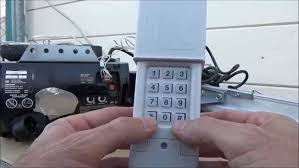
In this guide, we’ll break down the entire process in clear, actionable steps suitable for beginners.
Read too: Tc1 Tricode Garage Door Opener Remote W/ Clip Chamberlain: Complete Guide
Why You Should Change Your Clicker Garage Door Code
Keeping your garage secure is important. Key reasons to change your code include:
- Lost or stolen remotes
- Moving into a new home
- Regular security updates
- Multiple users who need different access codes
Experts recommend updating garage opener codes every 6–12 months for maximum safety.
Understanding How Clicker Garage Door Openers Work
Clicker garage door openers are simple wireless remote devices that communicate with your garage door motor via radio frequency. Each remote sends a unique code to the opener to trigger the door. When you change the code:
- The opener only recognizes the new code
- Old remotes no longer operate the door
- Security is restored
According to Wikipedia, garage door openers operate using standard RF protocols to ensure safe and consistent communication:
https://en.wikipedia.org/wiki/Garage_door_opener
Step-By-Step Guide: How To Change Code On Clicker Garage Door Opener
Step 1: Locate the Learn/Program Button
- Found on your garage door motor unit
- Usually near the antenna or light
- Marked as “Learn,” “Program,” or “Set”
Step 2: Clear Old Codes
- Press and hold the Learn button for 10 seconds
- The indicator light will turn off or blink, signaling old codes are erased
Tip: This step ensures that previous remotes can no longer open your garage.
Step 3: Program New Remote
- Press the Learn button briefly (light will blink)
- Press the button on your Clicker remote
- Hold until the motor light flashes or you hear a click
- Test the remote—door should respond immediately
Step 4: Repeat for Additional Remotes
If you have multiple Clicker remotes:
- Repeat Step 3 for each remote
- All remotes must be reprogrammed after clearing old codes
Step 5: Confirm Security
- Test each remote individually
- Ensure no old or unknown devices operate the door
- Keep the motor area secure to prevent unauthorized programming
Tips for Smooth Code Change
- Use fresh batteries in all remotes
- Avoid programming near large metal objects to reduce interference
- Follow manufacturer guidelines for model-specific steps
- Note down the new code in a secure location
Troubleshooting Common Issues
| Problem | Cause | Solution |
|---|---|---|
| Remote doesn’t work | Battery low | Replace battery |
| Garage doesn’t respond | Code not synced | Repeat programming |
| Multiple remotes fail | Old codes not cleared | Clear all codes, then reprogram |
| Indicator light won’t blink | Faulty motor board | Inspect wiring, consult professional |
Advantages of Updating Your Clicker Code
- Improved security – Prevent unauthorized access
- Device management – Control which remotes are active
- Peace of mind – Know your system is current and safe
DIY vs Professional Help
| Option | Pros | Cons |
|---|---|---|
| DIY | Quick, free, convenient | Risk of mistakes if steps are skipped |
| Professional | Ensures correct programming, works with older systems | Costs $50–$100+ per visit |
FAQ: How To Change Code On Clicker Garage Door Opener
1. How often should I change my Clicker garage door code?
Every 6–12 months or immediately if a remote is lost.
2. Can multiple remotes be synced to one opener?
Yes, but each must be reprogrammed after clearing old codes.
3. What if my Clicker remote still doesn’t work after programming?
Check the battery, ensure correct button press sequence, or clear and repeat programming.
4. Is it safe to change the code myself?
Yes. The process is straightforward and doesn’t require special tools.
5. Can I use the same code for multiple garages?
Each garage opener must have a unique code; using the same code for multiple doors is not recommended for security reasons.
6. What if my garage opener model differs slightly?
Refer to the manufacturer’s guide. Most Clicker models follow similar programming sequences.
Conclusion
Changing your garage door code is simple, yet vital for maintaining security. By following this guide on How To Change Code On Clicker Garage Door Opener, you can:
- Clear old codes
- Program new remotes
- Protect your garage from unauthorized access
Keep your garage secure and enjoy the peace of mind that comes from knowing only trusted devices can operate your door.
If you found this guide useful, share it on social media to help others secure their homes too!
Leave a Reply