If your remote suddenly stops working or you’ve lost access control, you’re probably asking: How Do You Reset A Clicker Garage Door Opener? It’s a common issue that can be frustrating—especially when you’re in a hurry.
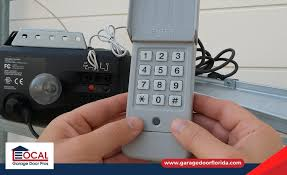
The good news is that resetting your Clicker garage door opener is usually quick and simple, even if you’re not tech-savvy.
What Is A Clicker Garage Door Opener?
A Clicker garage door opener is a universal remote system designed to work with most major garage door opener brands like LiftMaster, Chamberlain, and Genie.
Key Features:
- Compatible with multiple brands
- Uses rolling code or fixed code technology
- Easy DIY programming
Read too: Tc1 Tricode Garage Door Opener Remote W/ Clip Chamberlain: Complete Guide
👉 Learn more about how garage openers work:
https://en.wikipedia.org/wiki/Garage_door_opener
How Do You Reset A Clicker Garage Door Opener?
Resetting your Clicker opener can mean two things:
- Clearing the opener’s memory
- Reprogramming the remote
Let’s go step-by-step.
Method 1: Reset The Garage Door Opener (Clear Memory)
This method erases all programmed remotes and keypads.
Step-by-Step Instructions:
- Locate the Learn button
- Found on the garage door motor unit
- Usually near the antenna wire
- Press and hold the Learn button
- Hold for 6–10 seconds
- Wait for the LED to turn off
- This confirms memory is cleared
- Release the button
👉 All remotes are now erased.
Method 2: Reset And Reprogram Clicker Remote
After clearing memory, you’ll need to reconnect your Clicker remote.
Step-by-Step Instructions:
- Press and release the Learn button
- LED light turns on (30-second window)
- Press and hold the Clicker remote button
- Hold for 3–5 seconds
- Wait for the opener light to blink
- Test the remote
Method 3: Reset The Clicker Remote Itself
Some Clicker remotes can be reset independently.
Instructions:
- Press and hold the remote button
- Hold for 10–15 seconds
- Release when LED indicator flashes
- Reprogram using Method 2
Why Should You Reset Your Clicker Garage Door Opener?
Resetting is useful in several situations:
Common Reasons:
- Lost or stolen remote
- Moving into a new home
- Remote not responding
- Security concerns
- Adding new devices
👉 Security experts recommend resetting access systems regularly to prevent unauthorized entry.
Signs You Need A Reset
Look for these warning signs:
- Remote doesn’t open/close the door
- Intermittent response
- Multiple remotes not working
- Keypad failure
- Door opens randomly (rare but serious)
Troubleshooting After Reset
If your Clicker still isn’t working, try these fixes:
🔧 Quick Fix Checklist:
- Replace battery (CR2032 recommended)
- Stay within 1–3 feet during programming
- Ensure correct button timing
- Check opener compatibility
- Remove signal interference
Compatibility Guide For Clicker Remotes
Clicker remotes are designed to work with most systems.
| Brand | Compatibility | Notes |
|---|---|---|
| LiftMaster | Yes | Fully compatible |
| Chamberlain | Yes | Same parent company |
| Genie | Yes | May require extra steps |
| Craftsman | Yes | Most models supported |
Pros vs Cons Of Resetting
✅ Advantages:
- Improves security
- Fixes most remote issues
- Clears old or unknown devices
- Quick process (under 10 minutes)
❌ Disadvantages:
- Erases all remotes
- Requires reprogramming
- May not fix hardware issues
Real-Life Example
A homeowner noticed their garage door occasionally opening without input. After performing a full reset and reprogramming their Clicker remote, the issue disappeared completely.
👉 Lesson: Resetting can solve both functional and security problems.
Safety Tips When Resetting
- Use a stable ladder
- Keep hands away from moving parts
- Do not reset while door is in motion
- Keep children and pets away
- Disconnect power for advanced troubleshooting
Maintenance Tips For Long-Term Performance
Keep your Clicker opener working smoothly:
- Replace batteries every 6–12 months
- Clean remote contacts
- Reprogram after system upgrades
- Inspect opener annually
- Avoid dropping the remote
FAQ: How Do You Reset A Clicker Garage Door Opener
1. How long does it take to reset a Clicker garage door opener?
Typically 5–10 minutes, including reprogramming.
2. Will resetting delete all remotes?
Yes, a full reset clears all connected devices.
3. Why is my Clicker remote still not working after reset?
Possible reasons include dead batteries, compatibility issues, or incorrect programming steps.
4. Can I reset the remote without the Learn button?
No, the Learn button is required to sync with the opener.
5. Is resetting safe to do myself?
Yes, as long as you follow safety precautions.
6. How often should I reset my garage opener?
Only when necessary, such as after losing a remote or for security reasons.
Conclusion
Understanding How Do You Reset A Clicker Garage Door Opener gives you full control over your garage security and functionality. Whether you’re fixing a malfunction or protecting your home, resetting is a simple and effective solution.
With just a few steps, you can clear old codes, reprogram your remote, and restore smooth operation.
Leave a Reply