If your garage remote suddenly stops working or you’ve moved into a new home, you may be asking: How Do You Reprogram An Overhead Door Garage Door Opener? It’s a common issue—and thankfully, one that’s easy to fix. With a few simple steps, you can restore access, improve security, and get your system working like new again.
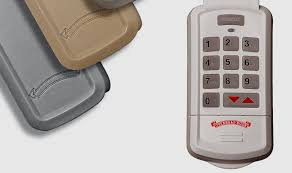
What Does Reprogramming a Garage Door Opener Mean?
Reprogramming involves resetting the connection between your garage door opener and its remote controls or keypads.
Read too: Tc1 Tricode Garage Door Opener Remote W/ Clip Chamberlain: Complete Guide
According to general system explanations like Garage Door Opener, modern openers use rolling code technology, which enhances security by changing access codes after each use.
Why Reprogramming Is Important
- Prevent unauthorized access
- Fix unresponsive remotes
- Sync new devices
- Reset after power outages
When Should You Reprogram Your Garage Door Opener?
Here are the most common situations:
- You lost a remote
- Remote stops responding
- You moved into a new house
- Battery replacement didn’t fix the issue
- Security concerns (possible hacking or interference)
💡 Expert Insight: Security professionals recommend reprogramming your opener at least once a year.
How Do You Reprogram An Overhead Door Garage Door Opener (Step-by-Step)
Follow this beginner-friendly guide:
Step 1: Locate the “Learn” Button
- Found on the motor unit (ceiling-mounted opener)
- Usually behind a light cover
- Colors vary: red, yellow, purple, or green
Step 2: Press the Learn Button
- Press and release the button
- An LED light will turn on
- You have 30 seconds to complete the next step
Step 3: Press the Remote Button
- Hold the button on your remote
- Wait for the opener light to blink or click
👉 This confirms successful programming.
Step 4: Test the Remote
- Press the remote again
- Ensure the door opens and closes properly
Step 5: Repeat for Additional Remotes
- Follow the same process for each device
How To Erase All Previous Codes (Full Reset)
If you want to remove all existing remotes:
Steps
- Press and hold the Learn button for 6–10 seconds
- Wait until the LED turns off
- All stored codes are now erased
⚠️ Important: You must reprogram all remotes after this step.
Common Problems During Reprogramming (And Fixes)
1. Remote Not Syncing
Cause: Weak battery
Fix: Replace battery and try again
2. Learn Button Not Working
Cause: Power issue
Fix: Check outlet and circuit breaker
3. Door Doesn’t Respond After Programming
Cause: Signal interference
Fix: Move closer and retry
4. LED Light Doesn’t Turn On
Cause: Faulty opener unit
Fix: Inspect or contact technician
Different Types of Garage Door Openers and Programming Differences
| Opener Type | Programming Method | Difficulty |
|---|---|---|
| Chain Drive | Learn button | Easy |
| Belt Drive | Learn button | Easy |
| Smart Openers | App + Learn button | Moderate |
| Older Models | DIP switches | Moderate |
How Long Does It Take to Reprogram a Garage Door Opener?
- Average time: 2–5 minutes
- Skill level: Beginner
👉 Most homeowners can complete the process without professional help.
Pro Tips for Successful Reprogramming
- Stand within 3–5 feet of the opener
- Replace remote batteries beforehand
- Avoid interference from other electronics
- Follow timing carefully (30-second window)
💡 Pro Insight: Timing is the most common reason reprogramming fails.
DIY vs Professional Reprogramming
DIY Reprogramming
Pros:
- Free
- Quick and simple
Cons:
- Requires following instructions carefully
Professional Service
Pros:
- Guaranteed results
- Includes system inspection
Cons:
- Costs $50–$150
Security Benefits of Reprogramming Your Garage Door Opener
Reprogramming isn’t just about convenience—it’s about safety.
Key Benefits
- Prevents unauthorized entry
- Eliminates lost remote risks
- Updates rolling codes
📊 Security Insight:
Modern rolling code systems generate billions of combinations, making unauthorized access extremely difficult.
Real-Life Example
A homeowner noticed their garage opening randomly. After resetting and reprogramming all remotes, the issue stopped completely. The cause was a previous owner’s remote still synced to the system.
👉 This shows why reprogramming is essential after moving into a new home.
FAQ: How Do You Reprogram An Overhead Door Garage Door Opener?
1. How do I find the Learn button on my opener?
It’s usually located on the back or side of the motor unit, often behind a light panel.
2. Can I reprogram my garage door opener without a remote?
Yes. You can reset the system using the Learn button and then pair new devices.
3. Why is my remote still not working after programming?
Check:
- Battery condition
- Distance from opener
- Possible interference
4. Do I need to reprogram after changing batteries?
Usually no, unless the remote loses its memory.
5. Is reprogramming difficult for beginners?
No. Most people can complete it in a few minutes with simple instructions.
6. Can multiple remotes be programmed?
Yes. Most systems support 3–7 remotes depending on the model.
Conclusion
Knowing How Do You Reprogram An Overhead Door Garage Door Opener gives you full control over your garage’s security and functionality. Whether you’re fixing a non-working remote or securing your home after a move, reprogramming is a quick and effective solution.
By following the simple steps in this guide, you can restore access in minutes—without calling a professional.
If you found this guide helpful, share it on social media to help others solve their garage door issues quickly and safely! 🚪
Leave a Reply