If you’ve lost your garage door remote or it’s no longer working, you might be asking, “How do you replace a garage door opener remote?” Replacing your remote may seem tricky at first, but with the right guidance, you can do it yourself safely and efficiently.
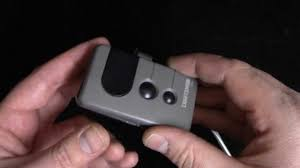
A functioning garage door remote ensures convenience and security. Understanding the replacement process and proper programming can save you time, money, and frustration.
Understanding Garage Door Remotes
Garage door remotes communicate with your opener using radio frequency (RF) signals.
Key Points:
- Most remotes operate on 315 MHz or 390 MHz frequencies, depending on the brand.
- The remote sends a signal to the opener’s receiver to open or close the door.
- Some newer models use rolling code technology to enhance security.
Read too: Tc1 Tricode Garage Door Opener Remote W/ Clip Chamberlain: Complete Guide
According to a survey by HomeAdvisor, lost or broken remotes are one of the top three causes of garage opener service calls in the U.S.
Tools and Materials Needed
Before starting, gather the following:
- New garage door remote compatible with your opener model
- Screwdriver
- Ladder (if programming requires access to the motor)
- User manual for your opener
- Optional: voltage tester for safety
Step-by-Step Guide: Replacing a Garage Door Remote
Step 1: Choose the Right Replacement
- Check your opener brand and model (LiftMaster, Chamberlain, Genie, etc.).
- Purchase a remote that matches the frequency and type of your opener.
- Verify the number of buttons matches your needs (single vs multiple doors).
Step 2: Remove the Old Remote
- Open the battery compartment and remove the old batteries.
- If the remote is broken, simply dispose of it safely.
Step 3: Insert Batteries in New Remote
- Use the correct battery type (usually CR2032 or AAA).
- Ensure polarity (+/-) matches the diagram in the compartment.
Step 4: Program the New Remote
Option A: Button Programming (Most Openers)
- Locate the “Learn” button on your garage door opener motor.
- Press and release the Learn button; the indicator light should start blinking.
- Within 30 seconds, press the button on your new remote.
- The motor light will blink or click, indicating successful programming.
Option B: Dip Switch Programming (Older Remotes)
- Open the remote’s battery compartment to access dip switches.
- Match the dip switch positions to the opener’s receiver panel.
- Test the remote; the door should respond immediately.
Testing the New Remote
- Stand clear of the door.
- Press the remote button to open and close the door.
- Test from various distances to ensure range is sufficient.
- Repeat for any additional remotes if replacing multiple units.
Common Problems and Solutions
| Problem | Possible Cause | Solution |
|---|---|---|
| Remote doesn’t work | Wrong frequency | Verify model and frequency compatibility |
| Door opens then stops | Weak batteries | Replace with fresh batteries |
| Opener light blinks | Rolling code not synced | Reprogram using Learn button |
| Limited range | Interference | Move remote or remove obstacles |
Regular maintenance of the remote, including battery checks, ensures long-term reliability.
Advantages of Replacing Your Remote Yourself
- Saves money compared to technician service ($50–$100 labor fee).
- Immediate access without waiting for appointments.
- Convenience of handling multiple remotes at once.
Disadvantages:
- Requires following instructions carefully to avoid misprogramming.
- Older openers may require specific dip switch alignment.
- Rolling code systems may need precise timing for synchronization.
Tips for Long-Term Remote Maintenance
- Replace batteries annually to avoid unexpected failure.
- Avoid dropping the remote, which can damage internal circuits.
- Keep away from extreme temperatures, as heat can warp plastic.
- Label remotes for multiple door setups to prevent confusion.
Real-Life Case Study
Scenario:
Emily, a homeowner in Texas, lost her original LiftMaster remote.
Solution:
- Emily purchased a compatible replacement remote from a certified dealer.
- Followed the Learn button programming instructions.
- Tested from several locations in her garage and driveway.
Result: The door operated perfectly, saving her $75 in technician fees.
Case studies show that with proper instructions, most homeowners can successfully replace a remote in under 15 minutes.
External Reference
For more information on garage door openers and remote technology, see Wikipedia: Garage Door.
FAQ: How Do You Replace A Garage Door Opener Remote
Q1: Can I use a universal remote for my garage door?
A: Yes, many universal remotes are compatible with multiple brands, but ensure frequency and coding match.
Q2: How long does it take to replace a garage door remote?
A: Typically 10–15 minutes for programming and testing.
Q3: Do I need professional help for remote replacement?
A: Usually not. Most replacements are DIY-friendly with a user manual.
Q4: Why isn’t my new remote working?
A: Check battery orientation, frequency compatibility, and reprogram using the Learn button.
Q5: Can one remote operate multiple garage doors?
A: Yes, provided the remote is programmed to each opener’s receiver.
Q6: What type of battery do garage door remotes use?
A: Most use CR2032 coin batteries or AAA batteries; consult your manual.
Conclusion
Replacing a garage door remote is a simple and cost-effective way to restore convenience and security. By understanding how do you replace a garage door opener remote, choosing the correct replacement, and following proper programming instructions, you can avoid unnecessary service fees and keep your garage functioning smoothly.
Share this guide with friends and family to help them replace their garage door remotes safely and efficiently.
Leave a Reply