A garage door is one of the most convenient and essential parts of a home. But when your Linear garage door opener isn’t working correctly or you’ve just installed a new remote or keypad, you may wonder, how do you program a Linear garage door opener.
Many homeowners struggle with syncing remotes, keypads, or integrating their opener with smart devices. Without proper programming, your garage may not function as intended, which can cause frustration or even security concerns.
Read too: How Do You Change Code On Garage Door Keypad Fast?
This ultimate guide will walk you through every step, from the simplest remote pairing to advanced keypad programming and troubleshooting. By the end, you’ll have complete control over your garage door system.
Understanding Your Linear Garage Door Opener
Before programming, it’s essential to understand what makes Linear openers different:
- Wireless Remotes: Linear remotes use fixed or rolling codes to communicate with your opener.
- Keypads: Mounted outside, these allow access with a PIN code.
- Wall Consoles: Some models have integrated buttons inside the garage.
- Safety Sensors: These prevent accidents by stopping the door if an object is detected.
According to a study by HomeAdvisor, nearly 25% of garage door issues are caused by unpaired remotes or improper programming.
Knowing your model and its components is the first step to successful programming.
Types of Linear Garage Door Openers
Linear has a range of models with varying features:
| Model | Features | Compatibility | Notes |
|---|---|---|---|
| Linear LDCO100 | Remote, Keypad | Single garage | Entry-level |
| Linear LDCO250 | Remote, Keypad, Wall console | Multi-garage | Includes timer-to-close |
| Linear DUAL | Dual motor | Large doors | Commercial use possible |
| Linear Smart | Wi-Fi integration | App control | Connects with smart home |
Always check your manual or the manufacturer’s website for exact compatibility.
How Do You Program a Linear Garage Door Remote
Programming a remote is one of the most common tasks homeowners face. Follow these detailed steps to avoid frustration:
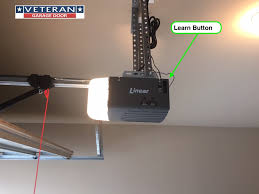
Step 1: Locate the “Learn” Button
- The Learn button is usually on the back or side of the opener motor.
- It may be covered by a small plastic panel.
Step 2: Prepare Your Remote
- Ensure your remote has a fresh battery.
- Hold the remote near the opener while programming.
Step 3: Press the Learn Button
- Press the Learn button once.
- The indicator light should turn on, signaling programming mode.
- You have about 30 seconds to activate the remote.
Step 4: Activate the Remote
- Press the desired button on your remote.
- The opener light or motor may flash to confirm successful programming.
Step 5: Test the Remote
- Press the button to open and close the garage door.
- Repeat for any additional remotes.
Troubleshooting Remote Issues
| Problem | Possible Cause | Solution |
|---|---|---|
| Remote doesn’t work | Dead battery | Replace battery and reprogram |
| Opener light flashes | Interference | Move remote closer, clear obstacles |
| Remote works intermittently | Weak signal | Replace batteries, check distance |
Tip: Only use Linear-approved remotes to avoid system errors.
How Do You Program a Linear Keypad
Keypads allow convenient access without a remote. Programming involves a slightly different process.
Step 1: Mount the Keypad
- Install in a convenient location near your garage door.
- Ensure it’s weather-protected.
Step 2: Enter Programming Mode
- Press the Learn button on your opener motor.
- The light will flash, indicating the system is ready to accept codes.
Step 3: Enter a PIN
- Choose a 4–8 digit code.
- Press Enter (or similar, depending on model).
- The opener light should flash to confirm the PIN is registered.
Step 4: Test the Keypad
- Enter the code and press the confirm button.
- The door should respond immediately.
Troubleshooting Keypad Issues
| Problem | Possible Cause | Solution |
|---|---|---|
| Keypad not working | Dead battery | Replace battery |
| Wrong code | Mistyped PIN | Reset and reprogram |
| Door won’t respond | Signal interference | Reposition keypad closer to opener |
Advanced tip: Some Linear keypads allow temporary codes for visitors, which can be set via the keypad instructions.
Integrating Remote and Keypad for Multi-Door Systems
If you have multiple garage doors, programming each remote and keypad to the correct opener is essential:
- Label each opener motor clearly.
- Program each remote sequentially to its respective opener.
- Test each door individually to prevent accidental operation.
- Keep a log of PIN codes for reference.
Multi-door setups are common in homes with large garages or workshops. Keeping track prevents confusion and enhances security.
Safety Tips for Programming
- Always disconnect power before handling wiring.
- Keep hands and fingers clear of moving parts.
- Avoid forcing the door manually while the opener is engaged.
- Use fresh batteries to prevent programming failures.
Safety should always be your top priority, especially with heavy garage doors and high-tension springs.
Next Steps
In the next sections (parts 4–6 of this ultimate guide), we will cover:
- Smartphone integration & smart home syncing
- Advanced troubleshooting and common errors
- Maintenance tips for long-term reliability
Leave a Reply