For many homeowners, security and convenience go hand in hand—but forgetting or needing to update your garage access code can quickly become frustrating. If you’ve been wondering How Do You Change Code On Garage Door Keypad, you’re in the right place. This guide walks you through simple, clear steps to reset and program your keypad safely and efficiently.
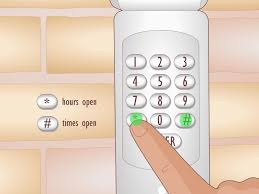
How Do You Change Code On Garage Door Keypad? (Quick Overview)
Changing your keypad code typically involves accessing your garage opener’s control panel and syncing a new PIN with the keypad.
Read too: Tc1 Tricode Garage Door Opener Remote W/ Clip Chamberlain: Complete Guide
Basic Process
- Locate the Learn button on your garage door opener
- Press and release the Learn button
- Enter a new PIN on the keypad (usually 4 digits)
- Press “Enter” to confirm
- Test the new code
Most modern garage systems follow this method, but variations exist depending on brand and model.
Where Is the Learn Button on a Garage Door Opener?
One of the most common questions is where to find the Learn button.
Common Locations
- On the back or side of the motor unit
- Under a light cover
- Near the antenna wire
Color Indicators
| Color | Meaning |
|---|---|
| Yellow | Newer security systems |
| Purple | Older rolling code systems |
| Red | Legacy models |
The Learn button activates programming mode, allowing your keypad to communicate with the opener.
Step-by-Step: How to Change Code on Garage Door Keypad
Let’s break it down into a detailed, beginner-friendly tutorial.
Step 1: Prepare Your Tools
- Step ladder (height 5–7 feet depending on garage)
- New PIN code (choose 4–6 digits)
- Flashlight if lighting is dim
Step 2: Access the Garage Opener
Climb the ladder carefully and locate the opener unit. Ensure the motor is powered on.
Step 3: Press the Learn Button
- Press the Learn button once
- An LED light will turn on for about 30 seconds
This window is when the system is ready to accept a new code.
Step 4: Enter Your New Code
- Go to the keypad outside
- Enter your chosen PIN
- Press Enter or # key
You may hear a click or see the garage light flash, confirming success.
Step 5: Test the New Code
Wait 5–10 seconds, then:
- Enter your new PIN
- Press Enter
- Ensure the garage door opens/closes smoothly
How to Reset a Garage Door Keypad Without Old Code
If you don’t remember your current PIN, don’t worry—you can still reset it.
Reset Method
- Hold the Learn button for 6–10 seconds
- Wait until the LED turns off (this clears memory)
- Reprogram a new code using the steps above
Important: This process may remove all remotes, so you’ll need to reconnect them.
Why Should You Change Your Garage Code Regularly?
Security experts recommend updating access codes periodically.
Key Reasons
- Prevent unauthorized access
- Protect against code guessing
- Maintain household safety
According to general home security practices referenced on Wikipedia, layered security—including updated access credentials—reduces intrusion risk significantly.
Common Mistakes to Avoid
Even simple tasks can go wrong. Here’s what to watch out for:
Mistakes
- ❌ Entering code after time window expires
- ❌ Choosing weak PINs (e.g., 1234)
- ❌ Forgetting to test after programming
- ❌ Standing too far from keypad
Pro Tip
Always complete programming within 30 seconds of pressing the Learn button.
Advantages vs Disadvantages of Changing Your Code
Pros
- ✔ Improves security
- ✔ Prevents unauthorized access
- ✔ Keeps system updated
Cons
- ✘ Requires reprogramming remotes
- ✘ Can be confusing for beginners
- ✘ Temporary inconvenience
How Long Does It Take to Change a Garage Keypad Code?
On average:
- 2–5 minutes for experienced users
- 5–10 minutes for beginners
The process is quick once you understand the steps.
What If Your Keypad Is Not Working?
Sometimes the issue isn’t the code—it’s the device.
Troubleshooting Checklist
- Replace battery (usually 9V or AA)
- Clean keypad surface
- Check wiring or signal
- Ensure compatibility with opener
If problems persist, consider replacing the keypad.
Best Practices for Choosing a Secure Garage Code
A strong PIN makes a big difference.
Recommended Guidelines
- Use 4–6 digits
- Avoid birthdays or simple sequences
- Change code every 3–6 months
- Do not share widely
FAQ: How Do You Change Code On Garage Door Keypad
1. Can I change my garage code without a Learn button?
Yes, but it depends on the model. Older systems may use dip switches instead of a Learn button.
2. How many digits should my garage PIN be?
Most systems support 4 to 6 digits, which balances security and convenience.
3. Will changing the code affect my remote controls?
Sometimes yes. A full reset may require reprogramming remotes.
4. Why is my new code not working?
Possible reasons include timing out, weak battery, or incorrect entry. Try reprogramming again.
5. Can I have multiple codes for one garage?
Some advanced systems allow multiple user PINs, but basic models usually support only one.
6. How often should I update my garage code?
Every 3–6 months or whenever security is a concern.
Conclusion
Changing your garage keypad code doesn’t have to be complicated. By following this guide on How Do You Change Code On Garage Door Keypad, you can improve your home security in just a few minutes. From locating the Learn button to setting a strong PIN, each step plays a vital role in keeping your property safe.
If you found this guide helpful, feel free to share it on social media so others can easily secure their garages too!
Leave a Reply