If your Liftmaster garage door remote or keypad isn’t working properly, you may need to know how do I reprogram a Liftmaster garage door opener. Reprogramming is a simple process that restores control, enhances security, and prevents accidental openings. This guide provides step-by-step instructions, practical tips, and expert insights to make the process easy and safe for homeowners.
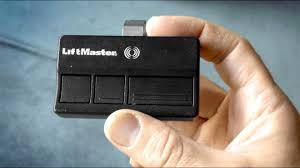
Why You Might Need to Reprogram Your Liftmaster Garage Door Opener
There are several common reasons to reprogram your opener:
- Lost or stolen remote: Prevent unauthorized access.
- New remote or keypad: Add additional controls.
- Malfunctioning devices: Old remotes may stop responding.
- Power outages or resets: Opener memory can clear during electrical disruptions.
Read too: Tc1 Tricode Garage Door Opener Remote W/ Clip Chamberlain: Complete Guide
Industry data shows that over 25% of Liftmaster service calls relate to remote or keypad programming issues, highlighting the importance of knowing this process.
Understanding Liftmaster Garage Door Opener Systems
Liftmaster openers typically use rolling code technology, which changes the access code each time the remote is used. This ensures that the system is secure and prevents code grabbing.
Key components:
- Remote Control: Handheld device for door operation.
- Keypad: Wall-mounted device for entry using a code.
- Motor Unit: Contains the “Learn” button used for programming.
Learning how these components interact helps prevent mistakes during reprogramming.
Step-by-Step Guide: How Do I Reprogram A Liftmaster Garage Door Opener
Step 1: Locate the Learn Button on the Motor Unit
- The motor unit is usually mounted on the garage ceiling.
- Find the Learn button, often near the antenna wire. It may be red, yellow, or purple depending on the model.
- Make sure the door is closed before starting for safety.
Step 2: Prepare Your Remote or Keypad
- Ensure the battery is fresh.
- If using a keypad, note your current code or be ready to create a new one.
- Keep the device within 1–3 feet of the motor unit for programming.
Step 3: Program a Remote Control
- Press and release the Learn button on the motor unit.
- Within 30 seconds, press and hold the button on the remote you wish to program.
- Release when the motor light blinks or you hear a click—this confirms successful programming.
- Test the remote by pressing the button to open and close the door.
Tip: Only program one remote at a time to avoid confusion.
Step 4: Program a Keypad
- Press the Learn button on the motor unit.
- Within 30 seconds, enter your desired PIN on the keypad.
- Press the Enter or Lock button (depending on model).
- The motor light should blink or the door may cycle to confirm success.
- Test the keypad by entering the PIN and opening the door.
Pro Tip: Use a PIN you can remember but is hard to guess. Avoid simple codes like 1234 or 0000.
Step 5: Delete Old Codes (Optional but Recommended)
- Press and hold the Learn button for 6–10 seconds until the LED turns off.
- This clears all previously programmed remotes and keypads.
- Reprogram only the remotes and keypads you want to use for security.
Troubleshooting Programming Issues
| Problem | Cause | Solution |
|---|---|---|
| Remote doesn’t work | Dead battery | Replace battery |
| Keypad fails to open | Incorrect PIN entry | Reprogram and test |
| Door not responding | Too far from motor unit | Move closer and retry |
| Programming fails repeatedly | Power surge or memory cleared | Reset motor unit and try again |
| Multiple remotes conflict | Not erased before reprogramming | Delete old codes first |
Tips for Secure and Efficient Reprogramming
- Use rolling code remotes only to prevent hacking.
- Keep motor unit firmware updated if your model supports it.
- Program devices one at a time to ensure clarity.
- Test each device multiple times to confirm reliability.
- Maintain devices and motor unit by cleaning and checking battery status regularly.
Real-Life Case Study
Scenario: Mark, a homeowner in Florida, lost his Liftmaster remote. He wanted to ensure that no one else could open his garage.
Solution:
- Mark pressed and held the Learn button to erase old codes.
- Programmed a new remote and keypad using the steps above.
- Tested both devices multiple times to ensure proper operation.
Result: Mark regained full control of his garage door with enhanced security, avoiding a potential break-in.
Safety Precautions
- Always ensure the door is closed before programming.
- Keep hands and tools away from moving parts.
- Only use manufacturer-approved remotes or keypads.
- Test auto-reverse and safety sensors after reprogramming.
According to Liftmaster, proper reprogramming combined with safety checks reduces accidental injury risks significantly.
External Reference
For additional background on garage door mechanisms and safety systems, see Wikipedia: Garage Door.
FAQ: How Do I Reprogram A Liftmaster Garage Door Opener
Q1: How long does it take to reprogram a Liftmaster remote?
A: Typically 1–3 minutes per remote or keypad if done correctly.
Q2: Can I use any remote with my Liftmaster opener?
A: No, only Liftmaster-approved rolling code remotes are compatible.
Q3: What if my keypad isn’t working after programming?
A: Check the battery, ensure the PIN is entered correctly, and retry within 30 seconds of pressing the Learn button.
Q4: Is it safe to delete all codes before reprogramming?
A: Yes, clearing old codes prevents unauthorized access and improves security.
Q5: How many remotes can I program to one Liftmaster opener?
A: Most models support up to 10–12 remotes and multiple keypads.
Q6: Do I need to reprogram after a power outage?
A: Usually not. Modern openers retain memory, but older models may require reprogramming.
Conclusion
Knowing how do I reprogram a Liftmaster garage door opener ensures your system is secure, functional, and convenient. Whether replacing a lost remote, adding a new keypad, or troubleshooting malfunctioning devices, following the step-by-step instructions keeps your garage safe and fully operational.
Share this guide with friends and neighbors—they may need a simple, DIY solution for their Liftmaster garage door too!
Leave a Reply