If you’re asking, “How Do I Program A LiftMaster Garage Door Remote,” you’re likely trying to sync a new or existing remote with your garage door opener. This is a common task for homeowners, and while it may seem technical, it’s actually quite simple once you understand the process.
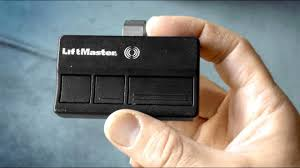
In this guide, you’ll learn step-by-step instructions, troubleshooting tips, and expert insights to help you program your LiftMaster remote quickly and correctly.
Read too: How Do You Change Code On Garage Door Keypad Fast?
What Is the LiftMaster Learn Button and Why Is It Important?
The Learn button is the key to programming your LiftMaster remote. It allows the opener to recognize and store signals from your remote control.
Where to find it:
- On the back or side of the garage door opener motor
- Under the light cover in some models
Common Learn button colors:
- Yellow
- Purple
- Red/Orange
- Green
💡 Each color may indicate a different frequency or technology type.
How Do I Program A LiftMaster Garage Door Remote (Step-by-Step)
Here’s the easiest and most reliable way to program your remote.
Step 1: Locate the Learn Button
- Use a ladder if necessary
- Remove the light cover if needed
- Identify the Learn button (usually near the antenna wire)
Step 2: Press the Learn Button
- Press and release the Learn button
- A small LED light will turn on
⏱ You now have 30 seconds to complete the next step.
Step 3: Press the Remote Button
- Press and hold the button on your remote
- Hold for 2–3 seconds, then release
- The opener light may blink or you may hear a click
✔ This confirms successful programming.
Step 4: Test the Remote
- Press the remote button again
- The garage door should open or close
🎉 If it works, your programming is complete!
How Many Remotes Can You Program?
Most LiftMaster garage door openers can store up to 8–12 remote devices, depending on the model.
Devices you can program:
- Handheld remotes
- Keyless entry pads
- Car-integrated systems (like HomeLink)
Programming Using a Control Panel (Alternative Method)
Some newer LiftMaster models allow programming directly from the wall control panel.
Steps:
- Press the “Menu” button
- Select “Program”
- Choose “Remote”
- Press the remote button
✔ This method is often easier for modern systems.
Why Won’t My LiftMaster Remote Program?
If you’re still asking, “How Do I Program A LiftMaster Garage Door Remote” but it’s not working, here are the common reasons:
1. Dead Remote Battery
- Replace with a new CR2032 battery
2. Learn Mode Timeout
- You only have 30 seconds after pressing Learn
- Repeat the process if needed
3. Memory Full
- The opener may have reached its limit
Fix:
- Hold the Learn button for 6–10 seconds to clear memory
- Reprogram all remotes
4. Compatibility Issues
- Not all remotes work with all models
5. Signal Interference
- Nearby electronics can interfere with programming
Quick Troubleshooting Table
| Problem | Cause | Solution |
|---|---|---|
| Remote not syncing | Missed timing | Retry within 30 seconds |
| No response | Dead battery | Replace battery |
| Works intermittently | Weak signal | Move closer |
| Cannot add new remote | Memory full | Reset opener |
How Long Does Programming Take?
On average, programming a LiftMaster remote takes less than 2 minutes.
According to garage door service data, over 85% of users successfully program their remote on the first try when following proper steps.
Understanding Garage Door Remote Technology
LiftMaster remotes use rolling code technology, which changes the access code each time you use the remote.
This improves security and prevents unauthorized access.
For more details, you can explore this concept here:
https://en.wikipedia.org/wiki/Rolling_code
Best Practices for Safe Programming
To ensure smooth operation:
- Always program remotes with the garage door closed
- Keep children away during setup
- Test safety reversal after programming
- Store remotes securely
✔ These steps ensure both convenience and safety.
FAQ: LiftMaster Remote Programming
Q1: How do I program a LiftMaster remote without a Learn button?
A: Most models require the Learn button. If unavailable, use the wall control panel or consult your model manual.
Q2: Can I program multiple remotes at once?
A: No, each remote must be programmed individually using the Learn button.
Q3: Why does my remote work but not consistently?
A: This could be due to a weak battery, signal interference, or range limitations.
Q4: Do I need a professional to program my remote?
A: No. Most homeowners can complete the process in minutes without professional help.
Q5: What happens if I reset the opener?
A: Resetting clears all programmed remotes, and you’ll need to reprogram them.
Q6: Can I program my car to open the garage door?
A: Yes, if your car supports systems like HomeLink, you can sync it using similar steps.
Conclusion
Now you know exactly how to program a LiftMaster garage door remote—and it’s much easier than it seems. With just a few simple steps, you can sync your remote in minutes and regain full control of your garage door.
By following this guide, you’ll avoid common mistakes, save time, and ensure your system works safely and reliably.
If you found this article helpful, feel free to share it on social media so others can quickly learn how to program a LiftMaster garage door remote too!
Leave a Reply