If you’re asking “How do I change code on garage door opener?”, you’re not alone. Changing the code on your garage door opener is an essential step to maintain security and prevent unauthorized access.
Whether you’ve misplaced a remote, moved into a new home, or simply want to refresh your security settings, knowing how to reset or reprogram the code ensures that only trusted devices can operate your garage door. This guide will explain the process step by step in a friendly, easy-to-follow manner, even if you’ve never handled a garage door opener before.
Read too: Tc1 Tricode Garage Door Opener Remote W/ Clip Chamberlain: Complete Guide
Why Change Your Garage Door Code
Changing your garage door opener code is more than just a precaution—it’s a security measure. Here are some key reasons:
- Lost or Stolen Remote: If a remote is lost, changing the code ensures that it can’t be used to access your garage.
- New Residents or Tenants: When moving into a new home or renting out a property, updating codes protects your belongings.
- Routine Security Update: Just like updating your Wi-Fi password, refreshing your garage door code periodically enhances home security.
- Prevent Unauthorized Access: Older remotes or neighbors with similar systems may inadvertently trigger your door.
According to the Wikipedia entry on garage door openers, modern openers use rolling code technology to prevent code theft, but knowing how to reset the system adds an extra layer of security.
Understanding Garage Door Opener Codes
Garage door openers use either fixed codes or rolling codes:
| Code Type | How It Works | Pros | Cons |
|---|---|---|---|
| Fixed Code | Manual switch or dip switches set a static code | Simple, easy to program | Less secure; code can be copied |
| Rolling Code | Changes code with every remote press | Highly secure | Requires precise reprogramming |
Most modern openers from Chamberlain, LiftMaster, and Genie use rolling codes for better security. Fixed code openers are still common in older systems, but they are vulnerable if codes are shared or guessed.
Step-by-Step Guide to Change Your Garage Door Opener Code
Step 1: Locate the “Learn” Button
- The learn button is typically on the back or side of the motor unit.
- It may be red, yellow, purple, or green depending on the brand.
- Remove the cover if necessary to access it.
Step 2: Clear Existing Codes
- For security, it’s best to erase all old codes before programming new ones.
- Press and hold the learn button for 6–10 seconds until the LED turns off.
- This clears all previously stored remote controls.
Step 3: Program a New Code
- Press the learn button once; LED should blink.
- Within 30 seconds, press the button on the remote you want to pair.
- Hold the button until the LED flashes or beeps—this confirms pairing.
- Test the remote to ensure the door responds.
Step 4: Add Additional Remotes
- Repeat Step 3 for each additional remote.
- Most openers allow 3–5 remotes to be programmed simultaneously.
Step 5: Set a Keypad Code (Optional)
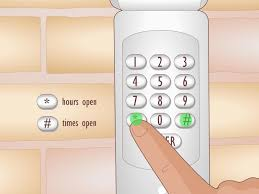
- If you have a wall-mounted keypad, press the learn button on the motor unit, then enter the desired 4-digit code on the keypad and press “Enter.”
- Test the keypad to confirm it operates the door correctly.
Tips for Successful Programming
- Ensure the door is fully closed during programming.
- Keep the remote within range of the opener.
- If programming fails, wait 30 seconds and retry.
- Always document your new codes in a safe place.
Troubleshooting Common Issues
| Issue | Cause | Solution |
|---|---|---|
| Door doesn’t respond to remote | Remote not paired or batteries low | Reprogram and replace batteries |
| LED doesn’t blink | Pressed learn button too long | Retry step with proper timing |
| Door operates inconsistently | Interference or weak signal | Remove obstructions; keep remote close |
| Keypad not working | Not synced with opener | Reprogram keypad using learn button |
| Remote operates other doors | Multiple similar systems nearby | Use unique rolling code, reprogram |
Safety Tips
- Always stand clear of the moving door while programming.
- Never attempt to bypass the system; this can damage the opener or void warranties.
- Keep remotes out of children’s reach.
Maintenance Tips to Prevent Future Problems
- Replace batteries annually to avoid signal loss.
- Clean keypad and remotes with a soft cloth.
- Inspect motor unit and antenna for dust or damage.
- Check alignment of sensors to prevent false reversals.
- Update codes periodically to maintain security.
Pro vs Cons Changing Garage Door Codes
| Advantages | Disadvantages |
|---|---|
| Enhanced security | Minor learning curve for new users |
| Prevents unauthorized access | Requires reprogramming all remotes |
| Easy to do with proper instructions | Mistiming can require a reset |
| Compatible with modern and old openers | Older models may lack learn button |
FAQ Section
Q1: How do I change code on a Chamberlain garage door opener?
A1: Press and hold the learn button on the motor unit, then press the remote button within 30 seconds. Test to confirm.
Q2: Can I program multiple remotes at once?
A2: Most openers allow 3–5 remotes. Program each one individually using the learn button.
Q3: How often should I change my garage door code?
A3: Security experts recommend every 6–12 months or after losing a remote.
Q4: What if my opener uses fixed codes?
A4: Locate the dip switches on the remote and motor unit, then match the new code.
Q5: Is it safe to change the code myself?
A5: Yes, as long as you follow manufacturer instructions. Stand clear of moving doors.
Q6: Can a neighbor’s opener accidentally open my door?
A6: Only if both systems use fixed codes that match. Changing to a rolling code eliminates this risk.
Real-Life Example
A homeowner lost a remote after moving into a new house. By following the steps above, they erased all old codes, programmed the remaining remotes, and set a new keypad code. Within 10 minutes, the garage door was fully secured and fully functional. This demonstrates how simple code changes enhance security without professional help.
Conclusion
Knowing how to change code on garage door opener is a simple yet powerful way to protect your home. By following this guide:
- You can erase old codes and reprogram new remotes.
- Maintain a secure home with minimal effort.
- Avoid unauthorized access and accidental activation.
Share this guide with friends, family, or neighbors to help them secure their garage doors too.
Leave a Reply