Dealing with a Genie Garage Door Won’t Open With Wall Switch issue can be frustrating—especially when you’re in a hurry. If your remote works but the wall control doesn’t (or nothing works at all), you’re not alone. This guide will walk you through simple, step-by-step solutions to diagnose and fix the problem quickly and safely.
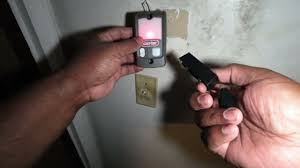
Why Is My Genie Garage Door Not Working With the Wall Switch?
When your wall switch stops working, it usually points to one of these common issues:
- Faulty wall switch
- Loose or damaged wiring
- Power supply problems
- Lock/vacation mode enabled
- Logic board malfunction
According to industry estimates, over 60% of garage door issues are electrical or connection-related—making them relatively easy to fix without replacing the entire system.
Read too: How Do You Change Code On Garage Door Keypad Fast?
For a deeper understanding of how garage door systems function, visit:
https://en.wikipedia.org/wiki/Garage_door_opener
Does the Remote Work but Not the Wall Switch?
This is one of the most common scenarios.
If YES (Remote Works):
👉 The issue is likely with:
- Wall switch wiring
- Wall button itself
- Lock/vacation mode
If NO (Nothing Works):
👉 The issue may involve:
- Power supply
- Motor unit
- Internal electronics
Step-by-Step: How To Fix Genie Garage Door Won’t Open With Wall Switch
Follow these steps in order to identify and resolve the problem.
Step 1: Check Power Supply
Before anything else, confirm the opener is receiving power.
What to do:
- Check if the opener light is on
- Ensure the unit is plugged in securely
- Test the outlet using another device
👉 If no power, reset the circuit breaker or replace a blown fuse.
Step 2: Inspect the Wall Switch
Wall switches can wear out over time.
Signs of a faulty switch:
- No response when pressed
- Loose or stuck button
- No indicator light (if applicable)
Quick test:
- Remove the wall switch cover
- Touch the two wires together briefly
👉 If the door moves, the switch is defective and needs replacement.
Step 3: Check for Loose or Damaged Wires
Wiring issues are extremely common.
Look for:
- Frayed wires
- Loose connections at the opener
- Disconnected terminals
Fix:
- Tighten screws
- Strip wire ends by 0.5 inches if needed
- Reconnect securely
Step 4: Disable Lock/Vacation Mode
Many Genie openers include a lock mode that disables wall controls.
How to check:
- Look for a blinking LED on the wall console
- Press and hold the lock button for 3–5 seconds
👉 Once disabled, test the wall switch again.
Step 5: Test the Safety Sensors
While sensors mainly affect closing, they can sometimes interfere.
Check:
- Alignment of both sensors
- Clean lenses
- No obstructions
👉 Sensors should show solid lights (not blinking).
Step 6: Reset the Garage Door Opener
A reset can clear minor glitches.
Steps:
- Unplug the opener
- Wait 30–60 seconds
- Plug it back in
- Test the wall switch
Step 7: Inspect the Logic Board
If all else fails, the issue may be internal.
Symptoms of a bad logic board:
- Wall switch and remote both fail
- Intermittent operation
- Burn marks or smell inside unit
👉 This typically requires professional repair or replacement.
Common Causes and Fixes (Quick Overview)
| Problem | Likely Cause | Solution |
|---|---|---|
| Wall switch not working | Broken switch | Replace switch |
| No power | Outlet or breaker | Restore electricity |
| Intermittent response | Loose wiring | Tighten connections |
| Locked system | Vacation mode active | Disable lock mode |
| No response at all | Faulty logic board | Repair or replace unit |
Pros vs Cons: DIY Fix vs Professional Repair
DIY Repair
✔ Saves money
✔ Quick fixes (under 30 minutes)
✔ No special tools required
Professional Repair
✔ Accurate diagnosis
✔ Safer for complex issues
✔ Warranty protection
Real-World Case Study
A homeowner reported their Genie opener worked with the remote but not the wall switch.
Diagnosis:
- Loose wire behind wall console
Fix:
- Reconnected wiring in under 10 minutes
Result:
- Full functionality restored
- $0 repair cost
👉 This shows how simple many of these issues can be.
When Should You Replace the Wall Switch?
Replace the switch if:
- It’s older than 5–7 years
- Button feels unresponsive
- Internal contacts are worn
💡 Replacement switches typically cost $15–$40, making them an affordable fix.
Safety Tips Before You Start
- Turn off power before handling wires
- Use insulated tools
- Avoid touching exposed wires
- Call a professional if unsure
FAQ: Genie Garage Door Won’t Open With Wall Switch
Q1: Why does my Genie garage door remote work but not the wall switch?
A: This usually indicates a wiring issue or faulty wall switch, not a problem with the opener itself.
Q2: How do I know if my wall switch is bad?
A: If touching the wires together activates the door, the switch is defective.
Q3: Can I fix garage door wiring myself?
A: Yes, basic wiring fixes are simple, but always turn off power first for safety.
Q4: What is lock mode on a Genie garage opener?
A: It disables wall controls to prevent unauthorized use. Hold the lock button for a few seconds to disable it.
Q5: How much does it cost to repair a Genie garage opener?
A: Minor fixes cost $0–$50, while major repairs can range from $150–$300.
Q6: Should I replace the opener if the wall switch fails?
A: Not necessarily. In most cases, replacing the switch or fixing wiring is enough.
Conclusion
If your Genie Garage Door Won’t Open With Wall Switch, don’t panic—most issues are simple and easy to fix. From checking power and wiring to replacing a faulty switch, you can often restore functionality in minutes without calling a technician.
By following this guide, you not only save money but also gain confidence in handling basic home repairs. If you found this helpful, feel free to share it with others—because a working garage door makes everyday life just a little bit easier. 🚪
Leave a Reply