If you’re dealing with a Genie Garage Door Opener Red Light On Motor Reset issue, you’re not alone. Many homeowners encounter this frustrating problem when their garage door suddenly stops working or behaves unpredictably.
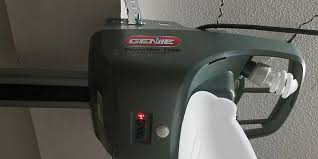
The good news? In most cases, the fix is straightforward—and you can often handle it yourself without calling a technician.
Read too: How Do You Change Code On Garage Door Keypad Fast?
What Does the Red Light on a Genie Garage Door Motor Mean?
The red light on your Genie garage door opener motor is a diagnostic indicator. It signals that something isn’t functioning properly within the system.
Common meanings of the red light:
- Sensor misalignment
- Obstruction in the door path
- Wiring issues
- Motor overheating
- Internal circuit fault
According to general garage door system data, nearly 70% of garage door issues are related to sensor or alignment problems, making it the most common culprit.
Why Is My Genie Garage Door Opener Showing a Red Light?
Let’s break down the most frequent causes behind this issue:
1. Misaligned Safety Sensors
Garage door openers use infrared sensors to detect obstacles. If these sensors are not aligned, the system won’t operate.
Signs:
- Door won’t close
- Blinking lights near the floor
- Red light stays on
2. Blocked Sensor Path
Even small objects like dust, leaves, or tools can block the beam.
Quick check:
- Inspect both sensors (left and right side)
- Remove debris or dirt
3. Wiring Problems
Loose or damaged wires can interrupt the signal.
Symptoms:
- Intermittent operation
- Flickering red light
4. Overheated Motor
If the motor runs too long, it may overheat and trigger a warning light.
Tip: Let it cool down for 15–30 minutes before retrying.
5. Power Supply Issues
Voltage fluctuations or power surges can cause the system to malfunction.
For more technical background on electrical systems, see this helpful overview on https://en.wikipedia.org/wiki/Electric_motor.
How to Perform a Genie Garage Door Opener Red Light On Motor Reset
Follow this step-by-step guide to reset your Genie opener safely and effectively:
Step 1: Disconnect Power
- Unplug the garage door opener from the outlet
- Wait 30–60 seconds
Step 2: Inspect Sensors
- Check alignment (both sensors should face each other)
- Clean lenses with a soft cloth
- Ensure indicator lights are solid (not blinking)
Step 3: Reconnect Power
- Plug the unit back in
- Observe if the red light remains on
Step 4: Reset the Motor Unit
- Locate the “Learn” or “Program” button
- Press and hold for 10–15 seconds
- Release when LED turns off or changes color
Step 5: Reprogram Remote (if needed)
- Press the “Learn” button again briefly
- Press your remote button within 30 seconds
Step 6: Test the Door
- Open and close the garage door fully
- Ensure smooth operation
Quick Troubleshooting Table
| Problem | Possible Cause | Solution |
|---|---|---|
| Red light stays on | Sensor misaligned | Adjust sensor position |
| Door won’t close | Obstruction detected | Clear path |
| Light blinking continuously | Wiring issue | Check and secure wires |
| Motor stops mid-operation | Overheating | Let motor cool down |
| No response after reset | Internal fault | Consider professional service |
Pro Tips to Prevent Future Issues
✔ Regular Maintenance
- Clean sensors every 2–3 months
- Check wiring annually
✔ Avoid Overuse
- Limit repeated open/close cycles within short time
✔ Stable Power Supply
- Use a surge protector to prevent electrical damage
✔ Inspect Tracks and Rollers
- Ensure smooth door movement to reduce motor strain
Advantages vs Disadvantages of DIY Reset
✔ Advantages
- Saves money (no technician fees)
- Quick fix (usually under 15 minutes)
- Easy to perform
✘ Disadvantages
- May not fix deeper internal issues
- Risk of incorrect reset steps
- Time-consuming if unfamiliar
When Should You Call a Professional?
You should consider expert help if:
- The red light persists after multiple resets
- You hear unusual grinding noises
- The motor smells burnt
- The door operates inconsistently
Industry data shows that about 15–20% of garage opener issues require professional repair, especially when internal components are involved.
FAQ: Genie Garage Door Opener Red Light On Motor Reset
Q1: Why is my Genie opener red light blinking continuously?
A: This usually indicates sensor misalignment or obstruction. Check both sensors and ensure they are properly aligned.
Q2: How long should I unplug the opener to reset it?
A: Wait at least 30–60 seconds before plugging it back in for a proper reset.
Q3: Can I reset my Genie garage door opener without a remote?
A: Yes. You can use the “Learn” button on the motor unit to perform a manual reset.
Q4: What if the red light stays on after reset?
A: This may indicate a deeper electrical or motor issue, and professional inspection is recommended.
Q5: Is it safe to fix this issue myself?
A: Yes, as long as you follow safety precautions like disconnecting power before inspection.
Q6: How often should I maintain my garage door opener?
A: Perform basic maintenance every 3–6 months to prevent issues.
Conclusion
Dealing with a Genie Garage Door Opener Red Light On Motor Reset problem can be frustrating—but in most cases, it’s completely fixable with a few simple steps. From checking sensors to resetting the motor, these solutions are designed to get your garage door back in working order quickly.
By following proper maintenance and troubleshooting practices, you can avoid future issues and extend the lifespan of your opener.
If you found this guide helpful, feel free to share it with others who might be facing the same problem!
Leave a Reply