Seeing a Genie Garage Door Opener red light flashing on motor can be alarming for homeowners. You may worry about expensive repairs or whether your garage door is safe to operate. The good news is that a flashing red light is usually a warning system designed to alert you of operational or safety issues. Understanding why it happens and how to fix it will save you both money and stress, ensuring your garage door operates safely and reliably.
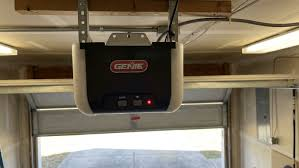
Whether you have a standard residential garage or a larger commercial setup, knowing how to interpret and respond to the red LED can prevent accidents and extend the life of your opener.
Read too: How Do You Change Code On Garage Door Keypad Fast?
Understanding the Red Light on Your Genie Opener
The red LED on a Genie motor serves multiple functions:
- Safety Alert: Indicates that the infrared sensors detect a potential obstruction or misalignment.
- Operational Warning: Alerts to motor issues, wiring faults, or power irregularities.
- Diagnostic Tool: Provides technicians with error codes to quickly identify malfunctions.
Expert Insight: According to Genie’s official support, “The red LED is not just a warning—it’s a diagnostic tool built to prevent property damage and ensure user safety.” (Wikipedia)
Common Causes of Red Light Flashing
1. Sensor Misalignment
The most frequent cause of a flashing red light is misaligned safety sensors. Genie openers use infrared sensors installed at the base of the garage door tracks to detect obstacles.
- Signs of misalignment:
- The door reverses immediately after closing.
- One or both sensor LEDs are not solid green.
- Fix: Adjust sensors until both LEDs turn solid green.
2. Obstructions in the Door Path
Even small objects—like dust, cobwebs, or tools—can trigger the safety system.
- Pro tip: Clean the area along the bottom 6 inches of the door regularly.
3. Power Supply or Wiring Issues
Loose connections, frayed wires, or inconsistent power can cause the red light to flash intermittently.
- Check wires from sensors to the motor.
- Ensure the outlet is grounded and stable.
4. Motor or Circuit Board Faults
If none of the above solutions work, the motor or internal circuitry might be at fault.
- Symptoms include erratic door movement, strange noises, or continuous LED flashing.
- Professional inspection is recommended in this case.
Step-by-Step Guide to Fixing the Red Light
Follow these steps carefully:
Step 1: Inspect and Align Safety Sensors
- Locate the sensors on either side of the garage door, about 6 inches above the floor.
- Clean the lenses with a soft, dry cloth.
- Adjust the sensor brackets to align the LEDs. Both should glow solid green.
Tip: Use a level to ensure sensors are perfectly aligned for optimal performance.
Step 2: Remove Obstructions
- Clear the entire garage door path.
- Check tracks and rollers for debris.
- Remove any small objects, dust, or cobwebs near the sensors.
Step 3: Verify Wiring and Power
- Turn off the power to the opener.
- Inspect all sensor wires for wear or frays.
- Reconnect any loose wires.
- Restore power and test operation.
Step 4: Reset the Opener
- Press and hold the “Learn” button on the motor for 6–10 seconds.
- The LED should turn off, signaling a reset.
- Test the door by pressing the wall control or remote button.
Step 5: Advanced Troubleshooting
- If the red light persists:
- Check the circuit board for visible damage.
- Inspect the motor for overheating or unusual noises.
- Contact Genie support or a licensed garage door technician if necessary.
Preventive Maintenance Tips
Keeping your Genie opener in good condition prevents future flashing red light issues.
- Monthly: Clean sensor lenses, inspect wires, and check for obstructions.
- Quarterly: Lubricate rollers, tracks, and hinges.
- Annually: Test the safety reversal system and inspect motor condition.
- Additional: Use a surge protector to prevent power spikes from damaging the circuit board.
Case Study: Real-Life Troubleshooting
Scenario: A homeowner noticed the Genie opener’s red light flashing intermittently.
Steps Taken:
- Checked sensor alignment — sensors were slightly tilted.
- Cleaned lenses and removed spider webs.
- Inspected wiring — minor frays corrected.
- Reset the opener — LED stopped flashing.
Result: The door functioned perfectly, and the red light no longer appeared.
Lesson: Most flashing red light issues are due to simple alignment or obstruction problems, not major hardware failure.
Common Mistakes to Avoid
| Mistake | Consequence | Solution |
|---|---|---|
| Ignoring flashing red light | Safety hazard, potential damage | Address the warning immediately |
| Using a dirty sensor lens | False alarms, door won’t close | Clean lenses monthly |
| Misaligned sensors | Door reverses unexpectedly | Use a level for perfect alignment |
| Skipping wiring inspection | Intermittent errors | Check wires annually |
| Over-tightening brackets | Sensor damage | Adjust gently |
Additional Tips for Genie Opener Users
- Keep the remote and wall console batteries fresh.
- Test the reversal system at least once a month.
- Label wires during maintenance for easy reconnection.
- Consider installing a backup battery for uninterrupted operation during power outages.
FAQ Section
Q1: Can I still operate my Genie opener with a flashing red light?
A: You may operate it temporarily, but the red light indicates a safety risk. Fix the underlying issue immediately.
Q2: How do I realign Genie safety sensors?
A: Loosen the sensor brackets slightly, adjust until the LED turns solid green, and tighten carefully.
Q3: Can cleaning sensors fix the red light problem?
A: Yes, dirt or dust can block the infrared signal, causing a false obstruction alert.
Q4: Do I need professional help?
A: Only if sensor alignment, obstruction clearing, and wiring checks don’t resolve the issue.
Q5: Can power surges trigger the red light?
A: Yes, sudden voltage spikes may trigger a warning. A surge protector is recommended.
Q6: How often should I inspect my Genie opener?
A: Quarterly inspection is ideal, including lens cleaning, wiring check, and operational testing.
Q7: Will replacing the motor fix the red light?
A: Only if the red light persists after all troubleshooting steps. Often, sensor or wiring issues are the cause.
Conclusion
A Genie Garage Door Opener red light flashing on motor is your system’s way of alerting you to potential issues—often minor but important for safety. By following steps like sensor alignment, clearing obstructions, wiring checks, and occasional maintenance, you can ensure your garage door operates smoothly and safely.
Regular inspections and preventive maintenance save both time and money, while protecting your home. Share this guide with friends and family to help them troubleshoot flashing red lights on their Genie garage door openers safely and effectively.
Leave a Reply