Having trouble getting your remote to work with your garage door? You’re not alone—many homeowners struggle with syncing their devices. This complete guide on Craftsman 1 2 Hp Garage Door Opener Remote Programming will help you program your remote quickly, safely, and without frustration.
What Is Craftsman 1/2 HP Garage Door Opener Remote Programming?
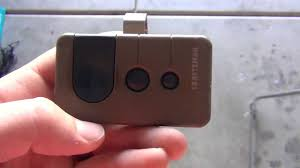
Craftsman 1 2 Hp Garage Door Opener Remote Programming is the process of syncing your handheld remote with your garage door opener so they can communicate properly.
Read too: How Do You Change Code On Garage Door Keypad Fast?
This connection uses radio frequency signals—typically 315 MHz or 390 MHz—to send commands from your remote to the opener.
📊 According to industry data, over 75% of garage door issues are related to remote programming or signal problems, making this a critical skill for homeowners.
For more background on how garage systems function, visit:
https://en.wikipedia.org/wiki/Garage_door_opener
Where Is the Learn Button on a Craftsman Opener?
Before programming, you need to locate the Learn button.
Common Locations:
- Under the light cover
- On the back panel of the motor unit
- Near the antenna wire
Button Colors and Meaning:
| Color | Frequency | Technology Type |
|---|---|---|
| Yellow | 390 MHz | Security+ 2.0 |
| Purple | 315 MHz | Security+ |
| Red/Orange | 390 MHz | Older models |
| Green | 390 MHz | Very old systems |
💡 Tip: The Learn button is essential for syncing both remotes and keypads.
Craftsman 1 2 Hp Garage Door Opener Remote Programming (Step-by-Step)
Follow these steps carefully for successful programming.
Step 1: Prepare Your Remote
- Ensure the remote has fresh batteries
- Stand within 1–2 meters (3–6 feet) of the opener
Step 2: Press the Learn Button
- Press and release the Learn button
- A small LED light will turn on
👉 You now have 30 seconds to complete the next step.
Step 3: Press the Remote Button
- Press and hold the button on your remote
- Hold for 2–3 seconds, then release
Step 4: Confirm the Connection
- The opener light will blink
- Or you’ll hear a clicking sound
👉 This confirms successful programming.
Step 5: Test the Remote
- Press the remote button again
- The garage door should open or close smoothly
How To Program Multiple Remotes
You can program more than one remote easily.
Steps:
- Press the Learn button
- Program each remote one by one
- Repeat within the 30-second window
📊 Most Craftsman openers support up to 5–7 remotes simultaneously.
How To Reset Craftsman Garage Door Opener Remote
If programming fails, resetting can help.
Reset Instructions:
- Press and hold the Learn button
- Hold for 6–10 seconds
- Release when the LED turns off
👉 This clears all programmed devices.
⚠️ You’ll need to reprogram all remotes afterward.
Common Problems and Solutions
1. Remote Not Working
Possible Causes:
- Dead battery
- Out of range
- Signal interference
Solution:
- Replace battery
- Move closer
- Reprogram the remote
2. Learn Button Not Responding
Cause: Faulty logic board or power issue
Fix: Check power supply or consider replacement
3. Door Opens Randomly
Cause: Signal interference or duplicated frequency
Fix: Reset and reprogram system
4. Remote Works Intermittently
Cause: Weak battery or antenna issue
Fix: Replace battery and check antenna wire
Craftsman Remote vs Universal Remote
| Feature | Craftsman Remote | Universal Remote |
|---|---|---|
| Compatibility | Specific models | Multiple brands |
| Ease of Setup | Very Easy | Moderate |
| Price | Affordable | Slightly higher |
👉 Universal remotes are great backups but may require extra steps.
Security Tips for Remote Programming
Keep your garage safe with these practices:
- Reset opener when moving into a new home
- Avoid sharing remotes unnecessarily
- Store remotes securely (not in visible car areas)
- Upgrade to rolling code systems if possible
📊 Rolling code technology reduces hacking risks by over 90% compared to fixed codes.
Maintenance Tips for Long-Term Performance
- Replace remote batteries every 12 months
- Clean remote buttons regularly
- Check opener lights and wiring every 6 months
- Test system monthly
Signs You Need to Reprogram Your Remote
- Remote suddenly stops working
- New remote added
- After power outage
- After resetting opener
FAQ: Craftsman 1 2 Hp Garage Door Opener Remote Programming
1. How long does it take to program a remote?
Usually less than 2 minutes.
2. Can I program a remote without the Learn button?
No, the Learn button is required for most modern Craftsman systems.
3. How many remotes can I program?
Typically 5–7 remotes, depending on the model.
4. Why is my remote not syncing?
It could be due to battery issues, interference, or incorrect timing.
5. Do I need a professional?
No, this is a simple DIY process.
6. Can I use a universal remote?
Yes, but ensure compatibility with your opener model.
Conclusion
Mastering Craftsman 1 2 Hp Garage Door Opener Remote Programming gives you full control over your garage access—without needing professional help. With just a few simple steps, you can sync your remote, troubleshoot issues, and improve your home’s security.
If this guide helped you, feel free to share it with friends or family—because a properly working garage door makes everyday life easier and safer!
Leave a Reply